Export your SketchUp model as a self-contained interactive HTML 3D file. Open it in any modern browser, share it easily and use it completely offline.

HTML3D Exporter — Free
HTML3D Exporter is a free SketchUp extension that exports your SketchUp model into a single interactive HTML file.
The resulting file can be opened directly in a modern web browser and shared with clients, colleagues or collaborators without requiring SketchUp, a dedicated viewer, a web server or an Internet connection.
The viewer is based on Three.js and all required resources are embedded directly inside the exported HTML file.
The main purpose is simple: share an interactive SketchUp model with someone who does not have SketchUp.
Main Features
- Single self-contained HTML 3D file
- Works completely offline
- SketchUp materials and textures
- Interactive orbit, zoom and pan navigation
- Light and Dark viewer themes
- SketchUp Tags browser
- Three-state Tags control: Visible / Transparent / Hidden
- Native SketchUp dimensions export
- Native SketchUp Leader Text export
- Interactive Annotations panel
- Optional colored PLY point cloud embedding
- Adjustable point size
- Optional PLY transformation
- Automatic fit-to-model views
- High-performance WebGL preference when a dedicated GPU is available
Export directly from SketchUp
HTML3D Exporter is launched directly from SketchUp.
The export dialog lets you configure the HTML viewer before generating the file.
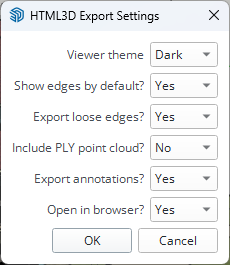
Available export options include:
- Viewer theme
- Default edge display
- Loose edges export
- Optional PLY point cloud
- SketchUp annotations
- Automatic opening of the generated file in the browser
Once the export is complete, the result is a single HTML file containing the model and its viewer.
SketchUp Tags
SketchUp Tags remain accessible from the HTML3D viewer.

The Tags panel can be opened directly from the viewer toolbar.
Each Tag can be controlled independently using three states:
Visible / Transparent / Hidden
This makes it possible to inspect the internal structure of a model or temporarily remove parts of it without modifying the original SketchUp file.
SketchUp Annotations
Native SketchUp dimensions and Leader Text annotations can be exported directly into the HTML viewer.

Leader Text annotations are automatically listed in the Annotations panel.
Clicking an annotation in the list automatically moves the camera to the corresponding location in the model.
This is particularly useful for:
- Design review
- Maintenance
- Inspection
- Technical communication
- Sharing remarks about a precise area of a model
Dimensions remain visible directly in the 3D scene.
Light and Dark modes
The viewer includes both Light and Dark display modes.
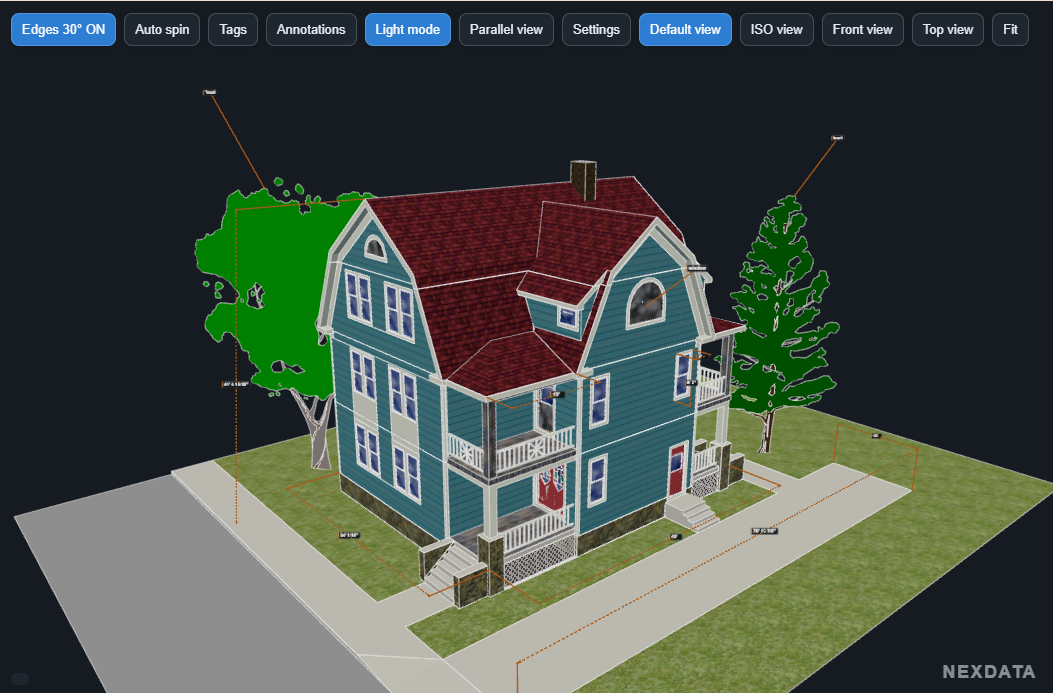
The display mode can be selected during export and changed directly from the viewer.
This makes the same HTML file suitable for different viewing environments without regenerating the model.
Point Cloud Support
HTML3D Exporter can optionally embed a colored PLY point cloud directly inside the HTML file.
This is particularly useful for:
- Laser scanning
- LiDAR surveys
- Industrial site surveys
- Comparison between existing conditions and a SketchUp model
- Engineering and retrofit projects
Point size can be adjusted in the viewer and an optional transformation can be applied to the PLY data during export.
Because the point-cloud data is embedded directly into the document, large point clouds naturally produce larger HTML files.
Why HTML3D?
No viewer installation
The recipient simply opens the HTML file in a modern browser.
No server
No local or remote web server is required.
Offline
Once exported, the file works without Internet access.
Easy to share
A single file contains the model, its resources and the interactive viewer.
SketchUp-aware
SketchUp Tags, dimensions and Leader Text annotations remain useful inside the exported viewer.
How it works
1. Install the RBZ extension in SketchUp
2. Open your SketchUp model
3. Launch HTML3D Exporter
4. Choose the export options
5. Generate the HTML file
6. Open or share the HTML file
The recipient only needs a modern web browser.
More than a GLB export
HTML3D Exporter is designed as a technical interactive viewer rather than simply a way to export geometry.
Alongside the 3D model, the generated HTML file can preserve useful SketchUp information such as:
- Tags
- Dimensions
- Leader Text
- Annotation navigation
- Optional point-cloud data
- Technical visibility controls
The recipient can therefore explore and understand the model without having access to the original SketchUp project.
Compatibility
SketchUp
Designed for desktop SketchUp versions supporting the required Ruby and native GLB export capabilities.
A fixed compatibility list is not published yet while additional SketchUp versions are still being tested.
Web browser
Generated HTML files are designed for modern WebGL-compatible browsers such as:
- Google Chrome
- Microsoft Edge
- Mozilla Firefox
Installation
- Download the
.rbzfile. - Open SketchUp.
- Go to Extensions → Extension Manager.
- Click Install Extension.
- Select
HTML3D_Exporter_lastest.rbz. - Restart SketchUp if required.
Download
Current version: 1.2.1 Free
Developed by Gilles Tarnus — FGId